Preface: Collision Detection in Video Games
This section gives a brief overview of how collision detection works in video games and introduces some terminology, so that we’re on the same page.
Collision Masks
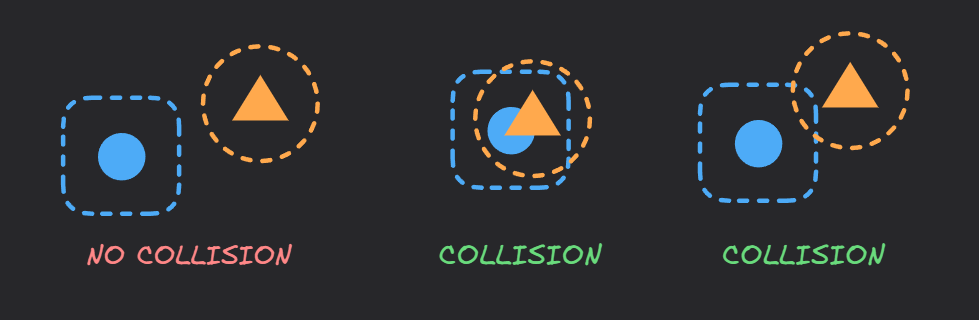
Objects in video games usually have invisible shapes attached to them for the purpose of detecting collisions. These shapes are known as collision masks (or collision boxes).
We say two objects are in collision when their collision masks overlap. Rectangles, circles, or other simple convex shapes are preferred to be used as masks because they are faster to check for overlaps.
In the following image, imagine the filled shapes are game objects, and the dotted lines are their collision masks. The square object has a rounded square collision mask, and the triangle object has a circular collision mask.
Frame-by-frame Collision Detection
Imagine you are playing a game. You shoot a bullet parallel to the -axis (in the positive -direction) at a speed of 10 units per frame. If the bullet is at in the current frame, it’s going to be at in the next frame. The bullet does not move in a continuous path from to , rather it teleports to the new position.
During each frame of the game, after updating the position of an object depending on the inputs and factors in the game world, its new position is compared with other objects to see if there is a collision. This frame-by-frame collision detection method is widely used because it’s simple, efficient, and goes well with the game loop pattern used commonly by game engines.
What is a Game Loop?
A game loop runs continuously during gameplay. Each turn of the loop, it processes user input without blocking, updates the game state, and renders the game. It tracks the passage of time to control the rate of gameplay.1
The key takeaway here is that a moving object passes through discrete points during its movement.
Tunneling
What if there is a wall between and , and the collision masks of both the bullet and the wall are small enough that they do not collide? The bullet simply passes through the wall! This incident is known as tunneling.
Hence, checking only for collision mask overlap at discrete points is not enough. Moving objects should check the volume covered in the continuous motion from one point to another, known as the swept volume2. This approach is known as Continuous Collision Detection (CCD).
No more tunneling!
The Problem
With tunneling solved, we now have a working collision system. But there is one issue - precision.
Notice in the video that the bullet appears to be destroyed slightly before it actually touches the wall. This happens because our current collision detection only tells us if a collision occurred during the frame, but not exactly where.
Hence, we can’t perfectly time a “destroy” effect (like the “boom” in the video), or apply an effect on the wall. This is the problem we’re trying to solve - finding exactly where the bullet collides with the wall.
Formally, the problem can be stated as follows:
Let be the starting time of the current frame and be the starting time of the next frame. Assuming two objects collide in the period , determine the exact moment when the collision first happens.
Suppose the bullet object has a function, check_collision(t0, t1, obstacle), that returns whether there is a collision between the object obstacle and the swept volume of the bullet from time t0 to time t1. Somewhere in the bullet’s update cycle, you might see something like:
if (!check_collision(t0, t1, obstacle)) {
  move_forward();
} else {
  double t = find_collision_time(t0, t1, obstacle);
  double collision_x = get_x_at_time(t);
  double collision_y = get_y_at_time(t);
  apply_destroy_effect(collision_x, collision_y);

  destroy_self();
}
We are going to implement the find_collision_time function - which returns the exact time of collision.
Solution 1: Linear Search
One simple approach is to check for collisions in small time steps between and . If we choose a step size , the algorithm requires collision checks where . This means the time complexity of the linear search is , as the number of checks () scales linearly with speed.
For maximum accuracy, we need to set , where units per frame is the speed of the bullet.
double find_collision_time(double t0, double t1, Object obstacle) {
  const double dt = (t1 - t0) / this->speed;
  for (double t = t0; t <= t1; t += dt) {
    if (check_collision(t0, t, obstacle)) {
      return t;
    }
  }
  return t1;
}
While this approach works, it becomes inefficient for high-precision collision detection with many objects. The accuracy of the result depends on the step count. Higher step count produces more accurate results, but at the cost of more collision checks. Lower step count performs fewer collision checks, at the cost of reduced accuracy.
The trade-off between accuracy and performance is the limitation of linear search. This can quickly become impractical for object-heavy games or games that require precise collision detection.
Can we make this more efficient without sacrificing precision? Turns out, we can!
Solution 2: Binary Search
Let’s denote check_collision(t0, t, obstacle) as . So is a function which returns if the swept volume of the bullet in the time interval collides with an obstacle, and otherwise.
Claim: If there is a collision in the swept volume during , there will also be a collision in any later time interval where . This can be proven formally, but the intuition is simple.
Proof
Let’s define the swept volume of an object over the time interval as
where is the object’s collision shape at time .
If , then
Therefore, if for an obstacle , then for all .
In other words, is monotonically non-decreasing with respect to . This monotonicity allows us to use binary search on . We can take the vs graph from our example to help with visualization:
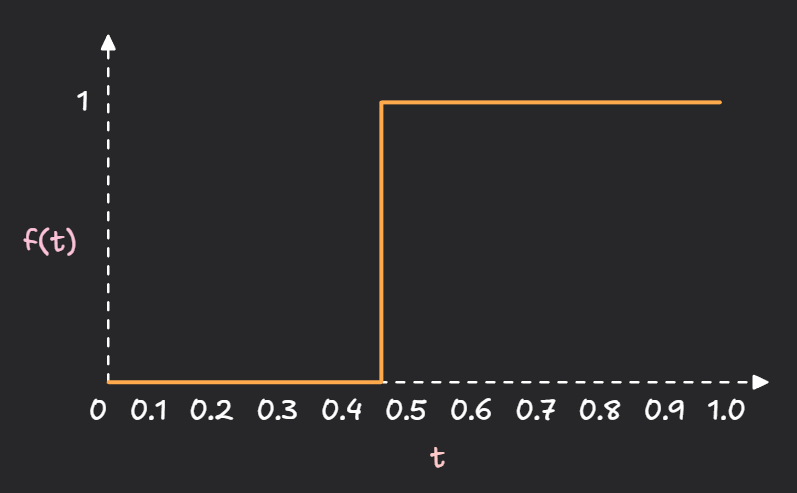
The problem can thus be restated as the following:
Find the minimum such that , where and .
While we could mathematically calculate for simple shapes (like a line vs a rectangle), binary search is powerful because it works for any collision shape. We don’t need to derive new methods if we change the player’s mask from a rectangle to a complex polygon; we can run the same search.
The implementation uses a precision to stop searching. I like to use a maximum cap of iterations in these scenarios because I don’t trust doubles.
Choosing
One option is to use a constant value for , like .
Another option is to make tied to the speed so that faster motion gets higher precision, like .
I like to use a combination of both! The precision scales with speed, but clamped so that the value doesn’t get too low or too high.
double find_collision_time(double t0, double t1, Object obstacle) {
  // Handle t0 separately - in case we are already colliding
  if (check_collision(t0, t0, obstacle)) return t0;

  // Handle (t0, t1]
  const double eps = clamp((t1 - t0) / this->speed, 1e-6, 1e-3);
  const int maxIterations = 1 + ceil(log2((t1 - t0) / eps));
  for (int i = 0; (i < maxIterations) && ((t1 - t0) > eps); ++i) {
    double mid = (t0 + t1) / 2.;
    if (check_collision(t0, mid, obstacle)) {
      t1 = mid;
    } else {
      t0 = mid;
    }
  }
  return t1;
}
The time complexity is which becomes when .
This way we get high precision (determined by the epsilon), with minimal number of collision checks. The algorithm gives us a very precise result in instead of in linear search.
Bonus
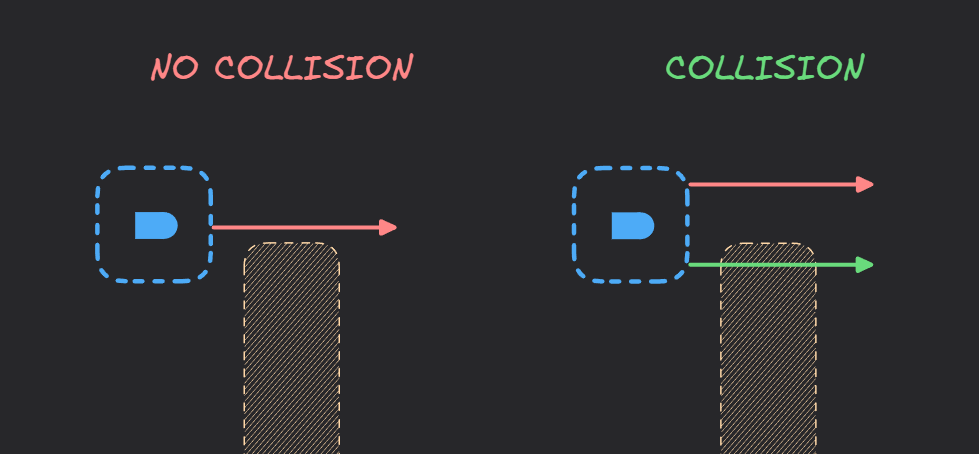
- The swept volume is rarely required in practice. Most of the time, we approximate the movement as a ray (or multiple rays) instead of the full swept volume to check for collisions. This becomes a line segment intersection problem, which can be solved in for most needs. This method is known as raycasting.
In some cases, raycasting can make you think hard about edge cases! You need to carefully consider the position and number of raycasts an object has to do. One such example is shown in the following image.
- The system can be expanded to a scenario where both colliding objects are in motion.
Make one object the reference frame relative to which the other object is in motion. Then apply the same technique discussed above.
References
-
“Game loop · Sequencing Patterns · Game programming Patterns.” https://gameprogrammingpatterns.com/game-loop.html (accessed Feb. 04, 2026). ↩
-
C. Ericson, Real-Time Collision Detection, 0 ed. CRC Press, 2004. doi: 10.1201/b14581. ↩